Your trial and license key
How your 14 days of Pro work, buy and activate Pro, move a key to another PC, and fix license messages.
PromptMason starts with 14 days of Pro. You don’t need a key for that. When the 14 days are up, it moves to the Free plan, which has every feature and room for 25 blocks and 15 prompts (see Plans and limits). A license key is only for people who buy Pro, or who get one from support.
Everything about your plan and key is in Settings, under Plan.
Your 14 days of Pro
The 14 days start by themselves the first time you open PromptMason. There is one trial per computer. You don’t enter anything.
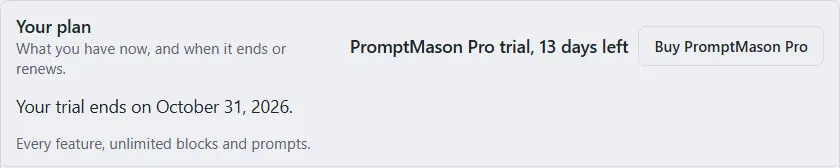
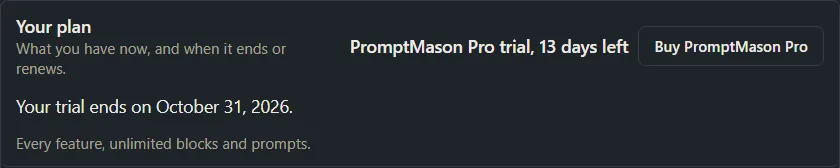
Your plan in Settings → Plan shows “PromptMason Pro trial, n days left”, with “Your trial ends on” and the date under it.
The first time you open PromptMason, after you choose how to start, Settings opens at Plan by itself, with the line “Have a key? Paste it here, then select Activate.” If you don’t have a key, close Settings and carry on.


Before and after the 14 days end
From three days before the end, a line at the top of every screen says “Your PromptMason Pro trial ends in n days.” (or “Your PromptMason Pro trial ends today.”), with Enter key and Buy PromptMason Pro. Plan in Settings has a dot next to it.


Enter key opens Settings → Plan with the cursor in the box under License key. Paste your Pro key and click Activate. See Activate a Pro key.
When the 14 days are over, PromptMason moves to Free, and Settings → Plan says “Your 14-day trial has ended. Buy PromptMason Pro to keep unlimited blocks and prompts.” Nothing is deleted. If you have more than 25 blocks or 15 prompts, your library is paused until you activate Pro or delete down to the limits. See When your library is paused.
Buy Pro
- Click Settings in the sidebar, then Plan.
- Under Your plan, click Buy PromptMason Pro. It shows on Free and during your 14 days of Pro.
- The checkout opens in your web browser. Follow its steps.
You can also buy from the Pricing page. Once you’ve paid, Polar’s page shows your Pro license key. Then activate it as described in the next section.
Activate a Pro key
- Click Settings in the sidebar, then Plan.
- Paste your Pro key into the box under License key. The box is labeled License key. If you already have a key, it is labeled New license key, with the line “Paste your Pro key, then select Activate.” under it.
- Click Activate. A new key replaces the one already on this PC, so there’s nothing to remove first.
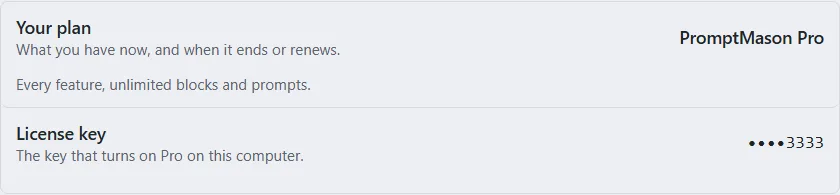
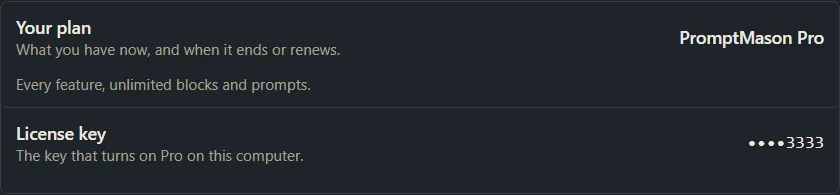
When it worked, Your plan shows PromptMason Pro, the box goes away, and the Free counters and limits are gone.
If Activate shows a message
| Message | What to do |
|---|---|
| “PromptMason couldn’t reach the license server. Check your internet connection and try again.” | Activating needs the internet. Connect, then click Activate again. |
| “That key wasn’t found. Check that you copied the whole key.” | Copy the key again from the email or page you got when you bought Pro, making sure you have all of it and no extra spaces or words, and paste it again. |
| “This key is already in use on as many computers as it allows. To move it here, open PromptMason on the other computer and select Remove license in Settings → Plan.” | The key is on its full number of computers. Remove it from one of them first (Move your key to another PC), then click Activate here again. |
| “This key has expired or been cancelled. Buy PromptMason Pro to get a new key.” | The key no longer works, for example a subscription that ended. Buy Pro to get a new key. |
| “That key isn’t a PromptMason key.” | The key is for another product. Find the key in the email or page you got when you bought Pro. |
| “Couldn’t activate the key. Try again.” | Click Activate again. If it keeps happening, write to support@promptmason.ai. |
If you think a message is wrong, write to support@promptmason.ai.
Move your key to another PC
A Pro key works on up to 3 of your own computers. To use it on another one when it’s already on 3, take it off one first.
Your key turns on Pro; it doesn’t bring your library with it. To have the same library on your other PCs, kept in step through your own cloud storage, see Use your library on a second PC.
On the PC you’re moving it from:
-
Click Settings in the sidebar, then Plan.
-
Click Advanced at the bottom of the pane.
-
Click Remove license.


There’s no confirmation: the key comes off as soon as you click, and that PC moves to Free straight away. If that PC has more than 25 blocks or 15 prompts, its library is paused.
You see “License removed. You can now activate the key on another computer.” Then activate the key on the other PC as in Activate a Pro key.
If that PC is offline, you see “License removed from this computer. PromptMason couldn’t reach the license server, so this computer may still count toward the key’s limit for a while.” The key is off this PC, but the PC you’re activating on may still say the key is on as many computers as it allows. Connect this PC to the internet and try again later, or write to support@promptmason.ai.
If you no longer have the old PC, write to support@promptmason.ai.
Your license key stays on the PC it was activated on. It isn’t in an exported file or a backup, and importing a file never changes it.
How your license is checked
PromptMason checks your key over the internet each time it starts, and every 24 hours while it’s open. The check never stops you working.
Checks go to the license service run by our payment provider, Polar, and they never send your library. What each one sends:
- Activate sends your license key, a random ID for this PC (not a hardware ID) and this PC’s name.
- Each check at start-up and every 24 hours sends your license key, the random ID for this PC, and the reference the license service gave this PC when you activated.
- Remove license sends your license key and that reference, which frees the key for another PC.
A PC with no key, including one on its 14 days of Pro, makes no license checks at all.
This PC’s name comes from Settings → Libraries & sharing → This PC’s name. Unless you’ve set Your name or This PC’s name there, it’s based on your Windows account name. If you’d rather not send that, set the name there before you activate a key. For everything else that can leave your PC, see Privacy in PromptMason.
If PromptMason can’t reach the license server (you’re offline, for example), it keeps your plan as it was at the last successful check:
- After 3 days without a check, a line at the top of every screen and Settings → Plan say “Couldn’t verify your license; you have n days before Free limits apply.” Connect to the internet, then click Open Settings in that line, or go to Settings → Plan, and click Check again.
- After 14 days without a check, the Free limits apply. Settings → Plan says “PromptMason couldn’t check your license for 14 days, so the Free limits apply. Connect to the internet and PromptMason will check again.” If you have more than 25 blocks or 15 prompts, your library is paused (When your library is paused). When a check works, Pro comes back. You can click Check again to check straight away.
If the message is still there after you click Check again, PromptMason still can’t reach the license server. Check your internet connection and try again.
Messages in Settings → Plan
When a key stops giving you Pro, Settings → Plan says why, and the box for a new key appears under License key.
| Message | What it means and what to do |
|---|---|
| “Your 14-day trial has ended. Buy PromptMason Pro to keep unlimited blocks and prompts.” | Your 14 days are over. Click Buy PromptMason Pro, then activate the Pro key. |
| “Your license has expired. Buy PromptMason Pro to keep unlimited blocks and prompts.” | The key has passed its end date. Buy Pro to get a new key. |
| “Your license is no longer active on this computer. This happens when a subscription ends or this computer was removed from the key. Buy PromptMason Pro, or activate another key.” | Your subscription ended, or the key was taken off this PC. Buy Pro, or paste another key and click Activate. If you think this is a mistake, write to support@promptmason.ai. |
| “PromptMason couldn’t check your license for 14 days, so the Free limits apply. Connect to the internet and PromptMason will check again.” | See How your license is checked. |
Want a hand?
Copy this prompt into Claude, ChatGPT or another AI assistant, and it walks you through it step by step.
I need help with my PromptMason license key or my 14 days of Pro. Walk me through activating a key in Settings, and tell me what to do about the message I'm seeing.
Copy adds a short note about PromptMason and this guide's steps, so the assistant has what it needs.
I need help with my PromptMason license key or my 14 days of Pro. Walk me through activating a key in Settings, and tell me what to do about the message I'm seeing. About PromptMason: a Windows desktop app for building AI prompts from reusable blocks. A person writes blocks (reusable pieces of prompt text), builds prompts from them on the Build screen (or keeps a Markdown document, such as a Skill), and copies a prompt into an AI tool, runs it in PromptMason’s own Chat, or lets a connected AI agent use it through PromptMason’s built-in MCP server (the Chrome extension copies prompts on any website). AI assist, Evaluate and Chat use a local model that runs on the person’s PC, or their own AI provider. The guides are also on PromptMason’s Help screen, and Chat can answer “how do I” questions from them. Libraries hold the blocks and prompts; a person can sync their personal library to their other PCs and share team libraries, both through a folder in cloud storage they already have (OneDrive, Google Drive or Dropbox). Everything synced is encrypted and every edit is signed and checked. A recovery kit (a file plus a code) is the spare copy of the person’s keys, for when every PC is lost. The official guide for this is "Your trial and license key": https://promptmason.ai/docs/license Its full text follows, between the lines. Use it as the source of truth, and if anything I see differs from it, tell me rather than guessing. --- PromptMason starts with 14 days of Pro. You don't need a key for that. When the 14 days are up, it moves to the Free plan, which has every feature and room for 25 blocks and 15 prompts (see [Plans and limits](https://promptmason.ai/docs/plans)). A license key is only for people who buy Pro, or who get one from support. Everything about your plan and key is in **Settings**, under **Plan**. ## Your 14 days of Pro The 14 days start by themselves the first time you open PromptMason. There is one trial per computer. You don't enter anything. **Your plan** in **Settings → Plan** shows "PromptMason Pro trial, *n* days left", with "Your trial ends on" and the date under it. The first time you open PromptMason, after you choose how to start, **Settings** opens at **Plan** by itself, with the line "Have a key? Paste it here, then select Activate." If you don't have a key, close Settings and carry on. ## Before and after the 14 days end From three days before the end, a line at the top of every screen says "Your PromptMason Pro trial ends in *n* days." (or "Your PromptMason Pro trial ends today."), with **Enter key** and **Buy PromptMason Pro**. **Plan** in Settings has a dot next to it. **Enter key** opens **Settings → Plan** with the cursor in the box under **License key**. Paste your Pro key and click **Activate**. See [Activate a Pro key](#activate-a-pro-key). When the 14 days are over, PromptMason moves to Free, and **Settings → Plan** says "Your 14-day trial has ended. Buy PromptMason Pro to keep unlimited blocks and prompts." Nothing is deleted. If you have more than 25 blocks or 15 prompts, your library is paused until you activate Pro or delete down to the limits. See [When your library is paused](https://promptmason.ai/docs/paused-library). ## Buy Pro 1. Click **Settings** in the sidebar, then **Plan**. 2. Under **Your plan**, click **Buy PromptMason Pro**. It shows on Free and during your 14 days of Pro. 3. The checkout opens in your web browser. Follow its steps. You can also buy from the [Pricing](https://promptmason.ai/pricing) page. Once you've paid, Polar's page shows your Pro license key. Then activate it as described in the next section. ## Activate a Pro key 1. Click **Settings** in the sidebar, then **Plan**. 2. Paste your Pro key into the box under **License key**. The box is labeled **License key**. If you already have a key, it is labeled **New license key**, with the line "Paste your Pro key, then select Activate." under it. 3. Click **Activate**. A new key replaces the one already on this PC, so there's nothing to remove first. When it worked, **Your plan** shows **PromptMason Pro**, the box goes away, and the Free counters and limits are gone. ## If Activate shows a message | Message | What to do | |---|---| | "PromptMason couldn't reach the license server. Check your internet connection and try again." | Activating needs the internet. Connect, then click **Activate** again. | | "That key wasn't found. Check that you copied the whole key." | Copy the key again from the email or page you got when you bought Pro, making sure you have all of it and no extra spaces or words, and paste it again. | | "This key is already in use on as many computers as it allows. To move it here, open PromptMason on the other computer and select Remove license in Settings → Plan." | The key is on its full number of computers. Remove it from one of them first ([Move your key to another PC](#move-your-key-to-another-pc)), then click **Activate** here again. | | "This key has expired or been cancelled. Buy PromptMason Pro to get a new key." | The key no longer works, for example a subscription that ended. Buy Pro to get a new key. | | "That key isn't a PromptMason key." | The key is for another product. Find the key in the email or page you got when you bought Pro. | | "Couldn't activate the key. Try again." | Click **Activate** again. If it keeps happening, write to [support@promptmason.ai](mailto:support@promptmason.ai). | If you think a message is wrong, write to [support@promptmason.ai](mailto:support@promptmason.ai). ## Move your key to another PC A Pro key works on up to 3 of your own computers. To use it on another one when it's already on 3, take it off one first. Your key turns on Pro; it doesn't bring your library with it. To have the same library on your other PCs, kept in step through your own cloud storage, see [Use your library on a second PC](https://promptmason.ai/docs/second-pc). On the PC you're moving it from: 1. Click **Settings** in the sidebar, then **Plan**. 2. Click **Advanced** at the bottom of the pane. 3. Click **Remove license**. There's no confirmation: the key comes off as soon as you click, and that PC moves to Free straight away. If that PC has more than 25 blocks or 15 prompts, its library is paused. You see "License removed. You can now activate the key on another computer." Then activate the key on the other PC as in [Activate a Pro key](#activate-a-pro-key). If that PC is offline, you see "License removed from this computer. PromptMason couldn't reach the license server, so this computer may still count toward the key's limit for a while." The key is off this PC, but the PC you're activating on may still say the key is on as many computers as it allows. Connect this PC to the internet and try again later, or write to [support@promptmason.ai](mailto:support@promptmason.ai). If you no longer have the old PC, write to [support@promptmason.ai](mailto:support@promptmason.ai). Your license key stays on the PC it was activated on. It isn't in an exported file or a backup, and importing a file never changes it. ## How your license is checked PromptMason checks your key over the internet each time it starts, and every 24 hours while it's open. The check never stops you working. Checks go to the license service run by our payment provider, Polar, and they never send your library. What each one sends: - **Activate** sends your license key, a random ID for this PC (not a hardware ID) and this PC's name. - **Each check at start-up and every 24 hours** sends your license key, the random ID for this PC, and the reference the license service gave this PC when you activated. - **Remove license** sends your license key and that reference, which frees the key for another PC. A PC with no key, including one on its 14 days of Pro, makes no license checks at all. This PC's name comes from **Settings → Libraries & sharing → This PC’s name**. Unless you've set **Your name** or **This PC’s name** there, it's based on your Windows account name. If you'd rather not send that, set the name there before you activate a key. For everything else that can leave your PC, see [Privacy in PromptMason](https://promptmason.ai/docs/privacy-overview). If PromptMason can't reach the license server (you're offline, for example), it keeps your plan as it was at the last successful check: - **After 3 days without a check,** a line at the top of every screen and **Settings → Plan** say "Couldn't verify your license; you have *n* days before Free limits apply." Connect to the internet, then click **Open Settings** in that line, or go to **Settings → Plan**, and click **Check again**. - **After 14 days without a check,** the Free limits apply. **Settings → Plan** says "PromptMason couldn't check your license for 14 days, so the Free limits apply. Connect to the internet and PromptMason will check again." If you have more than 25 blocks or 15 prompts, your library is paused ([When your library is paused](https://promptmason.ai/docs/paused-library)). When a check works, Pro comes back. You can click **Check again** to check straight away. If the message is still there after you click **Check again**, PromptMason still can't reach the license server. Check your internet connection and try again. ## Messages in Settings → Plan When a key stops giving you Pro, **Settings → Plan** says why, and the box for a new key appears under **License key**. | Message | What it means and what to do | |---|---| | "Your 14-day trial has ended. Buy PromptMason Pro to keep unlimited blocks and prompts." | Your 14 days are over. Click **Buy PromptMason Pro**, then activate the Pro key. | | "Your license has expired. Buy PromptMason Pro to keep unlimited blocks and prompts." | The key has passed its end date. Buy Pro to get a new key. | | "Your license is no longer active on this computer. This happens when a subscription ends or this computer was removed from the key. Buy PromptMason Pro, or activate another key." | Your subscription ended, or the key was taken off this PC. Buy Pro, or paste another key and click **Activate**. If you think this is a mistake, write to [support@promptmason.ai](mailto:support@promptmason.ai). | | "PromptMason couldn't check your license for 14 days, so the Free limits apply. Connect to the internet and PromptMason will check again." | See [How your license is checked](#how-your-license-is-checked). | --- How to help me: - Go one step at a time. After each step, ask what I see on screen before giving the next one. - Use the exact words on PromptMason’s buttons and screens, as the guide does. - Never ask me for my recovery code, my recovery kit file, a password or my invite line, and never ask me to paste them here. - Start by asking which step I’m on, or what I see now.